01
DES-010

SOLIDWORKS MBD
Model-based definition tools for communicating manufacturing information directly in 3D.
A combined electrical design solution that brings schematic design and 3D electrical integration into one connected workflow.
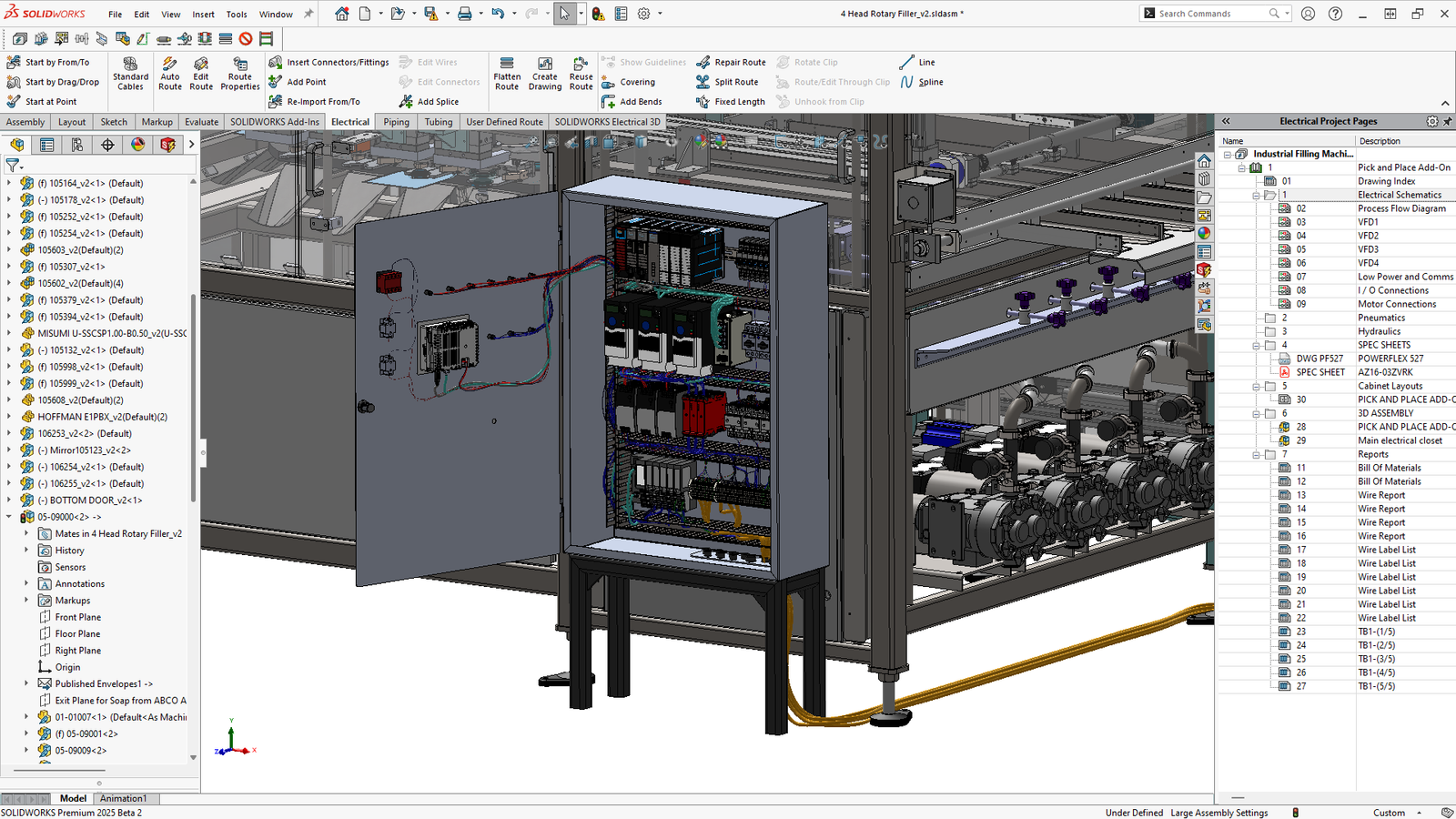
SOLIDWORKS® Electrical Professional combines the schematic design capabilities of SOLIDWORKS Electrical Schematic with the 3D capabilities of SOLIDWORKS Electrical 3D in one package.
SOLIDWORKS Electrical Professional combines SOLIDWORKS Electrical Schematic Professional and SOLIDWORKS Electrical 3D into one powerful electrical design package. It helps teams manage both 2D schematic creation and 3D electrical integration in a connected workflow. With tools for single-line and multi-line schematics, real-time collaboration, and 3D visualization, it supports a complete electrical design process from planning to product development.
Use this solution to improve the way your team creates, documents, reviews, and prepares product designs. Khodiyar Infotech helps you choose the right SOLIDWORKS software, plan licensing, train users, and support adoption after implementation.

SOLIDWORKS Electrical Professional is ideal for individuals supporting both electrical and mechanical teams whether you’re a solo designer filling both roles, or a schematic or 3D specialist working bidirectionally across teams.
SOLIDWORKS Electrical Professional combines the intelligent schematic capabilities of SOLIDWORKS Electrical Schematic Professional and the proven 3D modeling functionality of SOLIDWORKS Electrical 3D for one, high-powered design experience.
Support better collaboration with guidance from Khodiyar Infotech, including software selection, licensing, training, and adoption support.
SOLIDWORKS Electrical Professional integrates with a range of existing SOLIDWORKS products, from data management to flow simulation offerings, to meet your unique design and project management needs.
SOLIDWORKS Electrical Professional offers the best of both worlds–2D schematics plus 3D design. Combining SOLIDWORKS Electrical Schematic Professional and SOLIDWORKS Electrical 3D, SOLIDWORKS Electrical Professional provides a range of design capabilities spanning both 2D and 3D.
SOLIDWORKS Electrical Professional helps teams reduce repetitive manual work with intelligent design automation. It can automatically update labels, numbering, BOMs, wire lists, reports, and contact cross-references as the design changes. With circuit reuse, SQL-based real-time integration, and automated documentation tools, electrical and mechanical teams can work faster, reduce human error, and maintain accurate project data across both schematic and 3D design environments.
Request Guidance →
SOLIDWORKS Electrical Professional offers powerful schematic design tools for electrical, pneumatic, hydraulic, and PFD/P&ID systems. Teams can create intelligent line diagrams, detailed schematics, and associative wiring diagrams with greater accuracy. It also includes industry-standard symbol libraries, manufacturer part databases, and options to import custom parts and symbols. With 2D cabinet creation and multi-level terminal support, users can generate clear panel layouts directly from their electrical schematics.
Request Guidance →
SOLIDWORKS Electrical Professional brings 3D design and visualization capabilities through SOLIDWORKS Electrical 3D, helping teams plan electrical systems directly within the product model. It supports electrical harness design planning, auto-routing, flattened harness drawings, connector wiring tables, BOM documentation, and 3D electrical cabinet design. With real-time synchronization between schematic and 3D environments, teams can check fit, improve routing accuracy, reduce design errors, and create clearer manufacturing documentation.
Request Guidance →
SOLIDWORKS Electrical Professional integrates smoothly with other SOLIDWORKS solutions to create a more connected electrical design workflow. It works with SOLIDWORKS Design to bring electrical schematic data into the 3D model, helping electrical and mechanical teams collaborate in real time. Integration with SOLIDWORKS PDM supports secure data storage and workflow management, while SOLIDWORKS Flow Simulation helps teams analyze thermal performance and improve design safety.
Request Guidance →
Use this section only when package comparison is relevant. Khodiyar Infotech can help you select the right license based on your workflow.
| Feature | Standard | Professional Recommended | Premium |
|---|---|---|---|
| 3D Part Modeling | ✓ | ✓ | ✓ |
| Assembly Design | ✓ | ✓ | ✓ |
| 2D Drawings | ✓ | ✓ | ✓ |
| Design Reuse Tools | ✓ | ✓ | ✓ |
| CAD Libraries | — | ✓ | ✓ |
| Manufacturability Checks | — | ✓ | ✓ |
| Cost Estimation | — | ✓ | ✓ |
| Photo-Realistic Rendering | — | ✓ | ✓ |
| Advanced Component Libraries | — | — | ✓ |
| Design Validation | — | — | ✓ |
| Motion Analysis | — | — | ✓ |
| Routing Tools | — | — | ✓ |
| Advanced Simulation | — | — | ✓ |
| Cloud Collaboration | — | ✓ | ✓ |
| Data Management Support | — | — | ✓ |
| Training and Support | ✓ | ✓ | ✓ |
Khodiyar Infotech can help you compare Standard, Professional, and Premium options based on your actual workflow.
Three ways to deploy SOLIDWORKS Design — pick the model that fits how your team actually works.
Ideal for individual designers, engineers, or professionals who need dedicated access.
Suitable for engineering teams, shared workstations, and controlled business environments.
For teams that need collaboration, review, and connected workflows across locations.
We do more than provide software. We help your team select, implement, learn, and use SOLIDWORKS with confidence.
Understand which SOLIDWORKS product and package fits your workflow.
Get clear guidance before investing in software.
Get assistance with setup, deployment, and onboarding.
Help your team build practical skills and use the software effectively.
Software value depends on how confidently your team can use it. We provide practical training to help users improve speed, accuracy, and workflow confidence.
Get up to speed on SOLIDWORKS fundamentals — modeling, sketching, drawings, and assemblies.
Tackle complex modeling techniques, surfacing, sheet metal, and weldments with expert guidance.
Train teams on shared workflows, design standards, libraries, and PDM best practices.
Model-based definition tools for communicating manufacturing information directly in 3D.
Connect ECAD and MCAD workflows for better electronics and mechanical design collaboration.
Integrate electrical systems into 3D mechanical designs.
SOLIDWORKS Electrical Professional is used by teams that need to connect electrical schematics with 3D product design. It is especially useful for projects where electrical and mechanical teams must work together on wiring, cabinets, harnesses, panels, and embedded electrical systems.
Used for designing electrical systems inside machines, automation equipment, production lines, and industrial products where control wiring and mechanical fit need to work together.
Helps teams create 2D panel layouts and 3D cabinet designs, place components accurately, check space, and prepare better documentation for panel manufacturing.
Useful for planning harness routes, checking wire paths, calculating wire lengths, and creating flattened harness documentation for production teams.
Supports products where electrical systems are built directly into the mechanical design, such as machines, equipment, devices, and electro-mechanical assemblies.
Used by engineering teams that need to create structured schematics for electrical, pneumatic, hydraulic, PFD, and P&ID-related system documentation.
Helps electrical and mechanical engineers work in a connected environment where schematic data, 3D models, component placement, routing, and documentation stay aligned.
Find answers to common questions about SOLIDWORKS Electrical Professional, including schematic design, 3D electrical design, automation, cabinet layouts, harness development, and collaboration between electrical and mechanical teams.
SOLIDWORKS Electrical Professional is used to design, manage, and document electrical systems using both 2D schematic tools and 3D electrical design capabilities. It helps teams create schematics, wiring diagrams, cabinet layouts, harness routes, and manufacturing documentation in one connected workflow.
It combines SOLIDWORKS Electrical Schematic Professional and SOLIDWORKS Electrical 3D. This gives users access to single-line and multi-line schematic tools, electrical component libraries, 3D cabinet design, harness routing, flattened harness drawings, reports, and SOLIDWORKS integration.
Yes. It supports 3D electrical design through SOLIDWORKS Electrical 3D, allowing teams to place electrical components, route wires and harnesses, design cabinets, and visualize electrical systems inside the mechanical product model.
SOLIDWORKS Electrical Professional connects schematic design with 3D mechanical design, helping electrical and mechanical teams work with synchronized project data. This reduces manual data transfer, improves design accuracy, and helps teams identify fit, routing, and documentation issues earlier.
Yes. It includes intelligent automation for circuit reuse, wire numbering, component labeling, contact cross-referencing, BOMs, wire lists, and report generation. This helps reduce repetitive work and lowers the chance of documentation errors.
Yes. SOLIDWORKS Electrical Professional is useful for control panel and cabinet design because it supports 2D panel layouts, 3D cabinet layouts, terminal management, component placement, and wiring documentation.
Yes. It can help create flattened harness drawings, connector wiring tables, circuit summaries, BOM documentation, wire lists, and other production-ready electrical documents.
Yes. Khodiyar Infotech can help your team understand SOLIDWORKS Electrical Professional, choose the right license, plan adoption, and get support for setup, training, and electrical design workflows.
Khodiyar Infotech can help you understand licensing, implementation requirements, training options, and the right next step for your team.