01
DAT-012
Teamwork and Collaboration with Cloud Services
Cloud collaboration tools for sharing SOLIDWORKS designs, markup, secure storage, design review, revision communication, and project task visibility.
A collaboration role for accessing 3DEXPERIENCE platform communities, dashboards, conversations, and shared product data.
Connect your teams, ideas, files, and product conversations on one cloud-based platform. SOLIDWORKS 3DSwymer helps your organization collaborate from anywhere, share updates securely, and stay aligned throughout the product development process.
SOLIDWORKS 3DSwymer is a cloud-based collaboration role on the 3DEXPERIENCE platform that helps teams connect, communicate, and share product-related information in one place. It brings users together through dashboards, communities, file sharing, conversations, and collaborative apps that support everyday project communication.With 3DSwymer, teams can work from anywhere, access shared information, exchange ideas, and keep internal or external stakeholders updated. It is useful for organizations that want to improve collaboration across design, engineering, management, suppliers, and customers without relying only on scattered emails or disconnected file-sharing tools.
Use this solution to reduce file confusion, improve revision control, and keep engineering teams aligned across locations. Khodiyar Infotech supports licensing, deployment planning, user onboarding, and workflow setup.

3DSwymer allows users to access collaboration tools, shared files, dashboards, and team updates from anywhere through the cloud. This helps remote teams, office users, suppliers, and stakeholders stay connected without being tied to one location.
Teams can bring conversations, project updates, documents, and product information into one connected platform. This reduces scattered communication and helps everyone work with better visibility across ongoing design and development activities.
3DSwymer supports community-style collaboration where users can share ideas, post updates, comment, ask questions, and exchange knowledge. It creates a familiar social environment for professional product development communication.
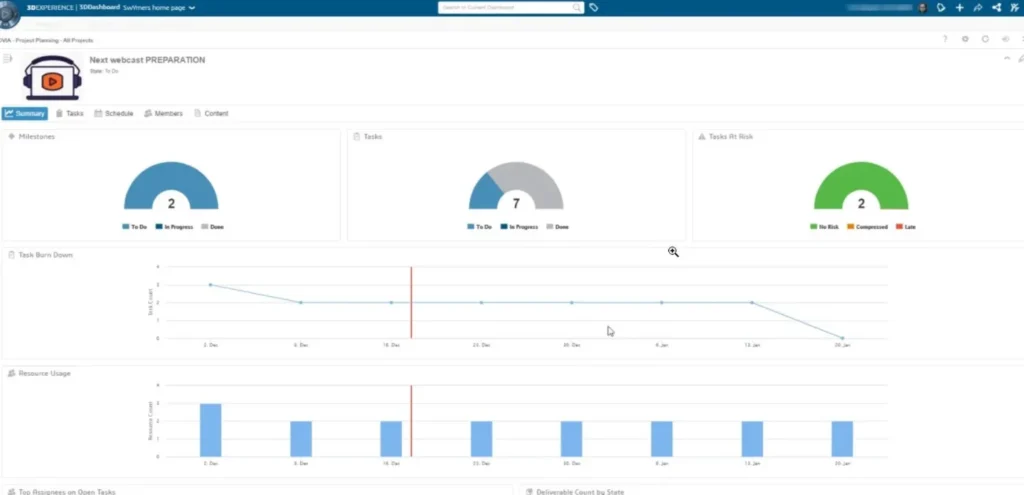
Dashboards and collaborative spaces help users track important updates, activities, files, and discussions. This makes it easier for teams to stay informed and respond quickly when product or project information changes.
Key workflow areas where this solution helps teams improve productivity, accuracy, and collaboration.
3DSwymer is designed for different users across the organization, including designers, engineers, managers, and project stakeholders. Product design managers can assign tasks and monitor progress, while designers and engineers can collect feedback, share ideas, and collaborate through 3DSwym communities. With search capabilities and integration with other 3DEXPERIENCE Works roles, teams can work more connected and efficiently.
Request Guidance →
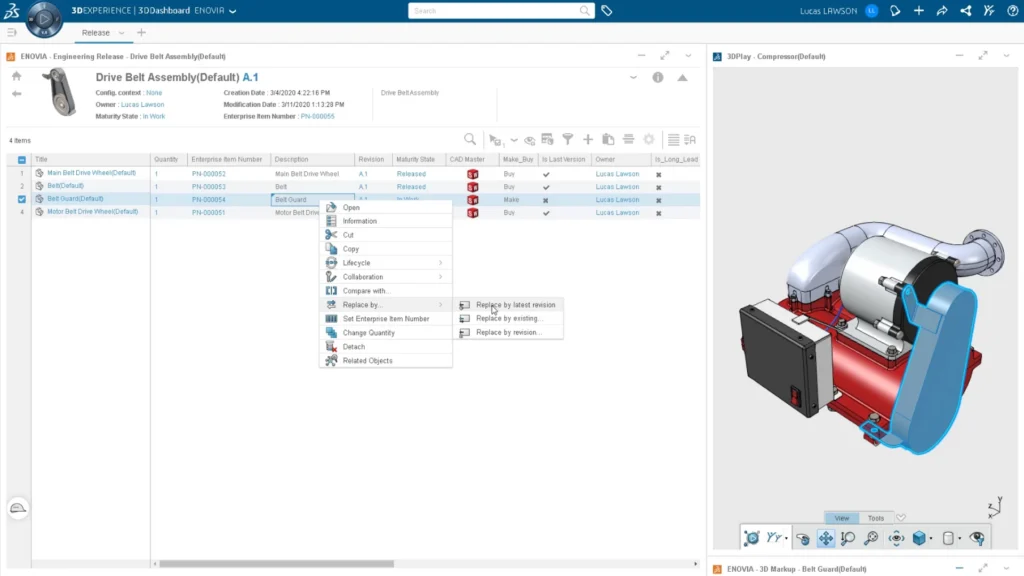
3DSwymer provides easy-to-use apps that support teams across the product development journey, from design discussions to project communication and data sharing. With tools like 3DDashboard, 3DSwym, 3DPlay, and 3DDrive, users can create personalized dashboards, build communities, view and review CAD models, and securely store or share files with teams, suppliers, and stakeholders.
Request Guidance →
3DSwymer helps the entire organization communicate and collaborate in one secure cloud environment. Teams can share SOLIDWORKS data, store important files, access collaboration tools, and engage stakeholders earlier in the design process. By reducing disconnected tools and manual status updates, it helps improve productivity, decision-making, and confidence across product development workflows.
Request Guidance →
Use this section only when package comparison is relevant. Khodiyar Infotech can help you select the right license based on your workflow.
| Feature | Standard | Professional Recommended | Premium |
|---|---|---|---|
| 3D Part Modeling | ✓ | ✓ | ✓ |
| Assembly Design | ✓ | ✓ | ✓ |
| 2D Drawings | ✓ | ✓ | ✓ |
| Design Reuse Tools | ✓ | ✓ | ✓ |
| CAD Libraries | — | ✓ | ✓ |
| Manufacturability Checks | — | ✓ | ✓ |
| Cost Estimation | — | ✓ | ✓ |
| Photo-Realistic Rendering | — | ✓ | ✓ |
| Advanced Component Libraries | — | — | ✓ |
| Design Validation | — | — | ✓ |
| Motion Analysis | — | — | ✓ |
| Routing Tools | — | — | ✓ |
| Advanced Simulation | — | — | ✓ |
| Cloud Collaboration | — | ✓ | ✓ |
| Data Management Support | — | — | ✓ |
| Training and Support | ✓ | ✓ | ✓ |
Khodiyar Infotech can help you compare Standard, Professional, and Premium options based on your actual workflow.
Three ways to deploy SOLIDWORKS Design — pick the model that fits how your team actually works.
Ideal for individual designers, engineers, or professionals who need dedicated access.
Suitable for engineering teams, shared workstations, and controlled business environments.
For teams that need collaboration, review, and connected workflows across locations.
We do more than provide software. We help your team select, implement, learn, and use SOLIDWORKS with confidence.
Understand which SOLIDWORKS product and package fits your workflow.
Get clear guidance before investing in software.
Get assistance with setup, deployment, and onboarding.
Help your team build practical skills and use the software effectively.
Software value depends on how confidently your team can use it. We provide practical training to help users improve speed, accuracy, and workflow confidence.
Get up to speed on SOLIDWORKS fundamentals — modeling, sketching, drawings, and assemblies.
Tackle complex modeling techniques, surfacing, sheet metal, and weldments with expert guidance.
Train teams on shared workflows, design standards, libraries, and PDM best practices.
Cloud collaboration tools for sharing SOLIDWORKS designs, markup, secure storage, design review, revision communication, and project task visibility.
Manage product release workflows, approvals, and lifecycle processes.
Plan, track, and manage product development tasks and project timelines.
SOLIDWORKS 3DSwymer is used by teams that need a shared cloud environment for communication, file sharing, design reviews, project updates, and collaboration across departments. It helps designers, engineers, managers, suppliers, and stakeholders stay connected throughout the product development process.
Used when teams need to share design updates, collect comments, review 3D models, and keep feedback organized in one collaborative space.
Helpful for teams working from different locations who need browser-based access to project information, shared files, and product development discussions.
Supports communication between designers, engineers, managers, suppliers, and customers through communities, chats, tasks, posts, and shared updates.
Used by non-CAD users to view, rotate, section, measure, and annotate 3D models without needing full CAD software access.
Helps teams securely store, manage, and share design files, project documents, and supporting data with internal users or external collaborators.
Used to create personalized dashboards, organize project information, capture knowledge, and keep teams updated with relevant tasks, files, and discussions.
Find answers to common questions about SOLIDWORKS 3DSwymer, including cloud collaboration, file sharing, dashboards, 3D viewing, communities, remote access, and how it supports product development teams.
SOLIDWORKS 3DSwymer is used to connect teams on the cloud through the 3DEXPERIENCE platform. It helps users collaborate, share files, review designs, manage discussions, create dashboards, and stay updated across product development activities.
Yes. 3DSwymer is a role within the 3DEXPERIENCE Works portfolio. It provides cloud-based apps and services that help teams collaborate, share knowledge, and work together from anywhere.
Yes. 3DSwymer is cloud-based and can be accessed through a web browser on supported devices. This makes it useful for remote teams, distributed departments, and external collaboration.
3DSwymer includes collaboration apps such as 3DDashboard, 3DSwym, 3DPlay, and 3DDrive. These tools support dashboards, communities, 3D model viewing, file storage, sharing, and project collaboration.
Yes. With 3DPlay, stakeholders can view, rotate, section, measure, and annotate 3D models without needing full CAD software. This helps managers, suppliers, customers, and reviewers participate more easily in design reviews.
It gives teams one connected space to share updates, assign tasks, discuss ideas, store files, and review design information. This reduces dependency on disconnected tools, emails, and scattered file-sharing methods
Yes. Managers can use dashboards to monitor relevant project information, review task progress, access shared updates, and stay informed about team activity without switching between multiple systems.
Yes. Khodiyar Infotech can help your team understand SOLIDWORKS 3DSwymer, choose the right 3DEXPERIENCE options, and get guidance for setup, licensing, training, and adoption.
Khodiyar Infotech can help you understand licensing, implementation requirements, training options, and the right next step for your team.