Home/Product Detail
DELMIAWORKS MANUFACTURING SOFTWARE

Manufacturing
Software from DELMIAWorks.

Improve shop-floor control, production visibility, scheduling, quality, and manufacturing performance with DELMIAWorks Manufacturing Software. Built for manufacturers, it helps teams monitor operations in real time, reduce downtime, improve resource planning, and manage production from raw material to customer delivery.

Manufacturing SoftwareProductionShop Floor
Real-Time Production Data
Shop-Floor Control
Scheduling & Planning
Quality & Traceability
Ø 142.0
R 38.5
ZXY
VERSION Official SOLIDWORKS SolutionPLATFORM WIN64STATUS READY
// 01 — Overview

What is Manufacturing Software from DELMIAWorks?

DELMIAWorks Manufacturing Software helps manufacturers manage production operations with better visibility, control, and real-time shop-floor information.

Manufacturing Software from DELMIAWorks is designed to help manufacturers control daily production activity more efficiently. It connects shop-floor data, work orders, machine performance, scheduling, inventory, quality, and reporting in one manufacturing-focused system.

With real-time production information, teams can reduce manual tracking, identify delays sooner, improve machine utilization, and make faster decisions. From planning and production to quality checks and delivery, DELMIAWorks gives manufacturers better control over the complete manufacturing process.

  • Real-time shop-floor visibility
  • Production and machine monitoring
  • Work order and scheduling control
  • Quality, traceability, and reporting support
Talk to a SOLIDWORKS Expert →
SOLIDWORKS_DESIGN.IDEv.Official SOLIDWORKS Solution
SOFTWARE_INTERFACE.PNG
// 02 — Benefits

How Manufacturing Software from DELMIAWorks Helps Your Team.

/// 01
+01

Reduce Production Downtime

Monitor production activity, machine status, and shop-floor issues in real time so teams can identify problems earlier and take action before delays affect delivery.

/// 02
+02

Streamline Plant Workflows

Replace disconnected manual updates with connected production data. This helps operators, supervisors, and managers work with clearer information across daily manufacturing activities.

/// 03
+03

Improve Resource Utilization

Plan machines, labor, materials, and production schedules more effectively. Better visibility helps teams reduce bottlenecks and use available capacity with more confidence.

/// 04
+04

Make Data-Driven Decisions

Access current production, quality, downtime, and performance data to support faster decisions and improve manufacturing efficiency across the plant.

// 03 — Capabilities

Manufacturing Software from DELMIAWorks Capabilities.

DELMIAWorks provides manufacturing operations and production management capabilities that help teams improve shop-floor control, scheduling, production reporting, traceability, inventory coordination, and quality performance.

/// CAPABILITY 01

Production Monitoring

Track production counts, machine status, downtime, scrap, rejects, and job progress in real time so teams can understand what is happening on the shop floor.

Request Guidance →
ERP_AND_PRODUCTION_CONTROL.PNG
/// CAPABILITY 02

Advanced Planning & Scheduling

Plan production based on capacity, labor, material availability, machine load, and delivery requirements to improve schedule accuracy and reduce bottlenecks.

Request Guidance →
MES_AND_SHOP-FLOOR_TRACKING.PNG
/// CAPABILITY 03

BOM & Work Order Management

Manage bills of material, routing, job details, production requirements, and work orders with better accuracy across the manufacturing process.

Request Guidance →
QUALITY_AND_WAREHOUSE_WORKFLOWS.PNG
/// CAPABILITY 04

Material Requirements Planning

Connect demand, inventory, purchasing, and production needs so teams can plan material availability and reduce shortages during production.

Request Guidance →
SUPPLY_CHAIN_COORDINATION.PNG
/// CAPABILITY 05

Traceability & Tracking

Track material movement, production status, supplier source, product history, and delivery-related information for better visibility across the complete process.

Request Guidance →
CAD_VIEWPORT.PNG
/// CAPABILITY 06

Warehouse Management

Support inventory movement, picking, putaway, stock availability, and warehouse coordination so production and fulfillment teams stay aligned.

Request Guidance →
CAD_VIEWPORT.PNG
// 04 — Packages

Manufacturing Software from DELMIAWorks Package Guidance.

Use this section only when package comparison is relevant. Khodiyar Infotech can help you select the right license based on your workflow.

FeatureStandardProfessional RecommendedPremium
3D Part Modeling
Assembly Design
2D Drawings
Design Reuse Tools
CAD Libraries
Manufacturability Checks
Cost Estimation
Photo-Realistic Rendering
Advanced Component Libraries
Design Validation
Motion Analysis
Routing Tools
Advanced Simulation
Cloud Collaboration
Data Management Support
Training and Support

Not Sure Which Package is Right?

Khodiyar Infotech can help you compare Standard, Professional, and Premium options based on your actual workflow.

Compare Packages with Expert →
// 05 — Licensing

Licensing and Deployment Guidance.

Three ways to deploy SOLIDWORKS Design — pick the model that fits how your team actually works.

/// LIC.01
01

Individual License

Ideal for individual designers, engineers, or professionals who need dedicated access.

  • Named-user access
  • Flexible usage
  • Best for individual CAD users
Ask About License →
/// LIC.02
02

Team / Network License

Suitable for engineering teams, shared workstations, and controlled business environments.

  • Team-based access
  • Centralized control
  • Suitable for growing design teams
Ask About License →
/// LIC.03
03

Cloud-Connected Options

For teams that need collaboration, review, and connected workflows across locations.

  • Cloud collaboration
  • Design sharing
  • Better team communication
Ask About License →
// 06 — Why Buy from Us

Why Buy SOLIDWORKS Through
Khodiyar Infotech?

Khodiyar Infotech helps manufacturers understand DELMIAWorks Manufacturing Software and choose the right solution for their production workflow.

/// 01
01

Product Consultation

Get guidance on how DELMIAWorks Manufacturing Software can support your production control, shop-floor visibility, scheduling, and quality requirements.

/// 02
02

Solution Selection

Understand which manufacturing modules and capabilities are suitable for your plant operations, team size, and business goals.

/// 03
03

Licensing Guidance

Receive support in understanding available product options, user requirements, and deployment considerations before making a purchase decision.

/// 04
04

Training & Support

Help your team adopt DELMIAWorks workflows with practical guidance for users, supervisors, managers, and production teams.

// 07 — Training

SOLIDWORKS Training for Better Adoption.

Manufacturing software works best when users understand how to apply it in real production workflows.

/// TRACK.01

Operator Workflow Training

Help shop-floor users understand job tracking, production updates, dashboard usage, and daily manufacturing activities.

    View Training →
    /// TRACK.02

    Production Planning Training

    Support planners and managers in using scheduling, work orders, materials, capacity, and production data more effectively.

      View Training →
      /// TRACK.03

      Quality & Inventory Training

      Guide teams on how quality checks, traceability, warehouse movement, and inventory visibility connect with production operations.

        View Training →
        // 09 — Use Cases

        Where Manufacturing Software from DELMIAWorks is Commonly Used.

        DELMIAWorks Manufacturing Software is useful for manufacturers that need real-time control over production, machines, materials, quality, and delivery.

        +
        Plastics Manufacturing

        Useful for injection molding, extrusion, thermoforming, and plastics processors that need production tracking, machine visibility, and traceability.

        +
        Automotive Components

        Supports manufacturers managing customer requirements, quality standards, delivery schedules, and supplier coordination.

        +
        Medical Manufacturing

        Helps regulated manufacturers improve process control, documentation, quality tracking, and traceability.

        +
        Packaging Manufacturing

        Supports high-volume production environments that need scheduling, monitoring, inventory control, and delivery coordination.

        +
        Assembly Manufacturing

        Helps manage BOM-based production, work orders, materials, quality checks, and final shipment activities.

        +
        Multi-Plant Operations

        Supports manufacturers that need better visibility across multiple facilities, production lines, inventory locations, and operational teams.

        // 10 — FAQ

        Frequently Asked Questions About Manufacturing Software from DELMIAWorks

        Find answers to common questions about DELMIAWorks Manufacturing Software, shop-floor control, production visibility, and adoption support.

        01What is DELMIAWorks Manufacturing Software?

        DELMIAWorks Manufacturing Software helps manufacturers manage shop-floor activity, production monitoring, scheduling, work orders, inventory, quality, traceability, and manufacturing performance from one connected system.

        02How does it help reduce downtime?

        It provides real-time visibility into machine activity, production progress, downtime, scrap, rejects, and shop-floor issues, helping teams identify problems earlier and respond faster.

        03Does it support production scheduling?

        Yes. DELMIAWorks supports planning and scheduling workflows that help teams manage capacity, labor, materials, machine availability, and delivery requirements.

        04Can it help with traceability?

        Yes. DELMIAWorks supports tracking of materials, production status, supplier source, product history, and customer delivery information across the manufacturing process.

        05Is it useful for shop-floor teams?

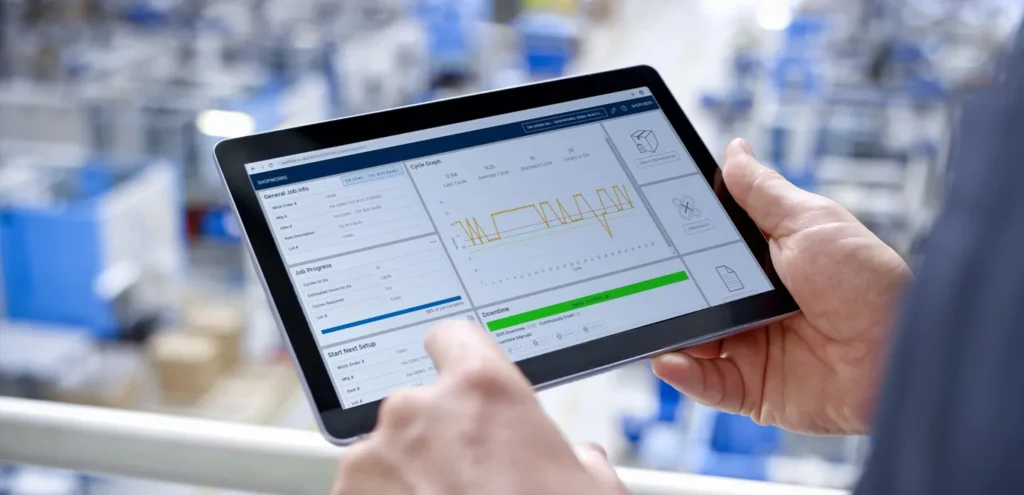
        Yes. With SHOPWORKS touchscreen dashboards and real-time production data, operators and supervisors can access important job and production information more easily.

        06Can Khodiyar Infotech help us choose the right DELMIAWorks solution?

        Yes. Khodiyar Infotech can help you understand the product, evaluate your manufacturing requirements, explain suitable options, and guide your team through solution selection.

        // Ready to Talk

        Need Help Choosing
        Manufacturing Software from DELMIAWorks?

        Tell us about your production workflow, shop-floor challenges, scheduling needs, and manufacturing goals. Khodiyar Infotech can help you understand DELMIAWorks Manufacturing Software and choose the right solution for your team.

        ProductManufacturing Software from DELMIAWorks
        Packages3 Tiers
        Free ConsultationIncluded
        Quote Validity30 Days
        LanguagesEN · HI · GU