Teamwork and Collaboration with Cloud Services

Home/Product Detail
SOLIDWORKS Product

Teamwork
and Collaboration with Cloud Services.

Cloud collaboration tools for sharing SOLIDWORKS designs, markup, secure storage, design review, revision communication, and project task visibility.

Cloud ServicesCollaborationDesign Review
Licensing Guidance
Training Available
Implementation Support
Local Expert Assistance
Ø 142.0
R 38.5
ZXY
VERSION Official SOLIDWORKS SolutionPLATFORM WIN64STATUS READY
// 01 — Overview

What is Teamwork and Collaboration with Cloud Services?

Cloud Services provide practical tools for sharing, storing, revising, reviewing, and controlling SOLIDWORKS design data in a connected cloud environment.

Use this solution to reduce file confusion, improve revision control, and keep engineering teams aligned across locations. Khodiyar Infotech supports licensing, deployment planning, user onboarding, and workflow setup.

  • Centralized data control
  • Revision and access management
  • Cloud collaboration
  • Project and release visibility
Talk to a SOLIDWORKS Expert →
SOLIDWORKS_DESIGN.IDEv.Official SOLIDWORKS Solution
SOFTWARE_INTERFACE.PNG
// 02 — Benefits

How Teamwork and Collaboration with Cloud Services Helps Your Team.

/// 01
+01

Control product data

Control product data with guidance from Khodiyar Infotech, including software selection, licensing, training, and adoption support.

/// 02
+02

Reduce version confusion

Reduce version confusion with guidance from Khodiyar Infotech, including software selection, licensing, training, and adoption support.

/// 03
+03

Improve approval workflows

Improve approval workflows with guidance from Khodiyar Infotech, including software selection, licensing, training, and adoption support.

/// 04
+04

Collaborate securely

Collaborate securely with guidance from Khodiyar Infotech, including software selection, licensing, training, and adoption support.

// 03 — Capabilities

Teamwork and Collaboration with Cloud Services Capabilities.

Key workflow areas where this solution helps teams improve productivity, accuracy, and collaboration.

/// CAPABILITY 01

Share and Markup

Share and Markup helps users send SOLIDWORKS designs for review without exporting files or asking stakeholders to install CAD software. Reviewers can open the shared design in a browser, add comments, redlines, measurements, and annotations, and send feedback back to the design team. This makes design reviews faster, clearer, and easier for both technical and non-technical stakeholders.

Request Guidance →
CENTRALIZED_DATA_CONTROL.PNG
/// CAPABILITY 02

Store and Revise

Store and Revise provides CAD-aware cloud storage designed for SOLIDWORKS data. Unlike normal cloud folders, it understands CAD file relationships, helping users manage parts, assemblies, drawings, and related references more reliably. Teams can manage revisions, access previous versions, lock files to avoid overwrites, and maintain a cleaner design history.

Request Guidance →
Store and Revise
/// CAPABILITY 03

Manage and Control

Manage and Control adds a more formal approach to design change management. Teams can define change processes, manage approvals, improve project visibility, and reduce uncontrolled shortcuts during product development. This is useful for organizations that need stronger governance, clearer responsibilities, and better control over design updates.

Request Guidance →
Manage and Control
// 04 — Packages

Teamwork and Collaboration with Cloud Services Package Guidance.

Use this section only when package comparison is relevant. Khodiyar Infotech can help you select the right license based on your workflow.

FeatureStandardProfessional RecommendedPremium
3D Part Modeling
Assembly Design
2D Drawings
Design Reuse Tools
CAD Libraries
Manufacturability Checks
Cost Estimation
Photo-Realistic Rendering
Advanced Component Libraries
Design Validation
Motion Analysis
Routing Tools
Advanced Simulation
Cloud Collaboration
Data Management Support
Training and Support

Not Sure Which Package is Right?

Khodiyar Infotech can help you compare Standard, Professional, and Premium options based on your actual workflow.

Compare Packages with Expert →
// 05 — Licensing

Licensing and Deployment Guidance.

Three ways to deploy SOLIDWORKS Design — pick the model that fits how your team actually works.

/// LIC.01
01

Individual License

Ideal for individual designers, engineers, or professionals who need dedicated access.

  • Named-user access
  • Flexible usage
  • Best for individual CAD users
Ask About License →
/// LIC.02
02

Team / Network License

Suitable for engineering teams, shared workstations, and controlled business environments.

  • Team-based access
  • Centralized control
  • Suitable for growing design teams
Ask About License →
/// LIC.03
03

Cloud-Connected Options

For teams that need collaboration, review, and connected workflows across locations.

  • Cloud collaboration
  • Design sharing
  • Better team communication
Ask About License →
// 06 — Why Buy from Us

Why Buy SOLIDWORKS Through
Khodiyar Infotech?

We do more than provide software. We help your team select, implement, learn, and use SOLIDWORKS with confidence.

/// 01
01

Product Consultation

Understand which SOLIDWORKS product and package fits your workflow.

/// 02
02

License Selection

Get clear guidance before investing in software.

/// 03
03

Installation & Setup Support

Get assistance with setup, deployment, and onboarding.

/// 04
04

Training & Ongoing Assistance

Help your team build practical skills and use the software effectively.

// 07 — Training

SOLIDWORKS Training for Better Adoption.

Software value depends on how confidently your team can use it. We provide practical training to help users improve speed, accuracy, and workflow confidence.

/// TRACK.01

Beginner Training

Get up to speed on SOLIDWORKS fundamentals — modeling, sketching, drawings, and assemblies.

  • Sketching & part modeling
  • Assembly basics
  • 2D drawing creation
View Training →
/// TRACK.02

Advanced CAD Training

Tackle complex modeling techniques, surfacing, sheet metal, and weldments with expert guidance.

  • Advanced part techniques
  • Sheet metal & weldments
  • Top-down design
View Training →
/// TRACK.03

Team Workflow Training

Train teams on shared workflows, design standards, libraries, and PDM best practices.

  • Design standards
  • PDM workflow basics
  • Library & template setup
View Training →
// 09 — Use Cases

Where Teamwork and Collaboration with Cloud Services is Commonly Used.

Teamwork and Collaboration with Cloud Services is commonly used by SOLIDWORKS teams that need to securely store design data, share models for review, manage revisions, collect feedback, and collaborate with stakeholders without relying on disconnected files, screenshots, or manual version tracking.

+
CAD-Aware Cloud Storage

Used by design teams that need cloud storage built for SOLIDWORKS files, including part, assembly, and drawing relationships. This helps teams keep design data organized and easier to access.

+
Design Sharing with Stakeholders

Helpful when engineers need to share SOLIDWORKS designs with managers, customers, suppliers, or external reviewers using secure links instead of sending large physical files.

+
3D Markup and Review

Used for browser-based design reviews where stakeholders can view models, add markups, take measurements, add annotations, and provide clear feedback without needing full CAD software.

+
Revision and Version Management

Ideal for teams that want to avoid confusion caused by duplicate files, outdated versions, or renamed “final” files. Cloud Services helps users manage revisions with better control.

+
Remote and Distributed Teams

Useful for engineering teams working across different locations who need secure access to shared design data, project files, and feedback from anywhere.

+
Design Data Control and Change Workflows

Used when teams need stronger control over design changes, approvals, issue tracking, and project tasks as their data management requirements grow beyond basic file sharing.

// 10 — FAQ

Frequently Asked Questions About Teamwork and Collaboration with Cloud Services.

Find answers to common questions about Cloud Services for SOLIDWORKS, including cloud storage, design sharing, markup, revision control, file locking, collaboration, and how it helps teams manage SOLIDWORKS design data more effectively.

01What is Teamwork and Collaboration with Cloud Services used for?

It is used to connect SOLIDWORKS design data with cloud-based storage, sharing, markup, and collaboration tools. Teams can store CAD files, manage revisions, share designs for review, and collect feedback in a more organized way.

02How is Cloud Services different from normal cloud storage?

Cloud Services is CAD-aware, which means it is designed to understand relationships between SOLIDWORKS parts, assemblies, and drawings. This makes it more suitable for managing design files than standard cloud folders.

03Can I share SOLIDWORKS designs with people who do not have CAD software?

Yes. Designs can be shared through secure links, and reviewers can view and mark up the model in a browser without downloading extra CAD software or viewers

04Does Cloud Services support 3D markup?

Yes. Stakeholders can review models in 3D and add feedback using markups, measurements, redlines, and annotations. This helps teams communicate design changes more clearly.

05Can Cloud Services help with revision control?

Yes. Cloud Services helps teams manage revisions, avoid accidental overwrites, and keep users working with updated design data. It also supports file locking so users can protect active work from unwanted changes.

06Is Cloud Services useful for remote teams?

Yes. Since data is connected through the 3DEXPERIENCE platform, teams can access shared design information, review updates, and collaborate with stakeholders from different locations.

07Can Cloud Services support formal change management?

Yes. As team needs grow, Cloud Services can support more advanced data management workflows such as issue management, change actions, approvals, and project task coordination.

08Can Khodiyar Infotech help with Cloud Services setup?

Yes. Khodiyar Infotech can help your team understand Cloud Services, choose the right SOLIDWORKS option, and get guidance for activation, setup, licensing, training, and adoption.

// Ready to Talk

Need Help Choosing
Teamwork and Collaboration with Cloud Services?

Khodiyar Infotech can help you understand licensing, implementation requirements, training options, and the right next step for your team.

ProductTeamwork and Collaboration with Cloud Services
Packages3 Tiers
Free ConsultationIncluded
Quote Validity30 Days
LanguagesEN · HI · GU

SOLIDWORKS 3DSwymer

Home/Product Detail
SOLIDWORKS Product

SOLIDWORKS
3DSwymer.

A collaboration role for accessing 3DEXPERIENCE platform communities, dashboards, conversations, and shared product data.

CollaborationPlatformTeamwork
Licensing Guidance
Training Available
Implementation Support
Local Expert Assistance
Ø 142.0
R 38.5
ZXY
VERSION Official SOLIDWORKS SolutionPLATFORM WIN64STATUS READY
// 01 — Overview

What is SOLIDWORKS 3DSwymer?

Connect your teams, ideas, files, and product conversations on one cloud-based platform. SOLIDWORKS 3DSwymer helps your organization collaborate from anywhere, share updates securely, and stay aligned throughout the product development process.

SOLIDWORKS 3DSwymer is a cloud-based collaboration role on the 3DEXPERIENCE platform that helps teams connect, communicate, and share product-related information in one place. It brings users together through dashboards, communities, file sharing, conversations, and collaborative apps that support everyday project communication.With 3DSwymer, teams can work from anywhere, access shared information, exchange ideas, and keep internal or external stakeholders updated. It is useful for organizations that want to improve collaboration across design, engineering, management, suppliers, and customers without relying only on scattered emails or disconnected file-sharing tools.

Use this solution to reduce file confusion, improve revision control, and keep engineering teams aligned across locations. Khodiyar Infotech supports licensing, deployment planning, user onboarding, and workflow setup.

  • Apps for All- from Design to Market
  • Something for Everyone
  • Everyone Wins
Talk to a SOLIDWORKS Expert →
SOLIDWORKS_DESIGN.IDEv.Official SOLIDWORKS Solution
SOFTWARE_INTERFACE.PNG
// 02 — Benefits

How SOLIDWORKS 3DSwymer Helps Your Team.

/// 01
+01

Work from Anywhere

3DSwymer allows users to access collaboration tools, shared files, dashboards, and team updates from anywhere through the cloud. This helps remote teams, office users, suppliers, and stakeholders stay connected without being tied to one location.

/// 02
+02

Connect in the Cloud

Teams can bring conversations, project updates, documents, and product information into one connected platform. This reduces scattered communication and helps everyone work with better visibility across ongoing design and development activities.

/// 03
+03

Get Social

3DSwymer supports community-style collaboration where users can share ideas, post updates, comment, ask questions, and exchange knowledge. It creates a familiar social environment for professional product development communication.

/// 04
+04

Stay Updated

Dashboards and collaborative spaces help users track important updates, activities, files, and discussions. This makes it easier for teams to stay informed and respond quickly when product or project information changes.

// 03 — Capabilities

SOLIDWORKS 3DSwymer Capabilities.

Key workflow areas where this solution helps teams improve productivity, accuracy, and collaboration.

/// CAPABILITY 01

Something for Everyone

3DSwymer is designed for different users across the organization, including designers, engineers, managers, and project stakeholders. Product design managers can assign tasks and monitor progress, while designers and engineers can collect feedback, share ideas, and collaborate through 3DSwym communities. With search capabilities and integration with other 3DEXPERIENCE Works roles, teams can work more connected and efficiently.

Request Guidance →
Something for Everyone
/// CAPABILITY 02

Apps for All- from Design to Market

3DSwymer provides easy-to-use apps that support teams across the product development journey, from design discussions to project communication and data sharing. With tools like 3DDashboard, 3DSwym, 3DPlay, and 3DDrive, users can create personalized dashboards, build communities, view and review CAD models, and securely store or share files with teams, suppliers, and stakeholders.

Request Guidance →
Apps for All- from Design to Market
/// CAPABILITY 03

Everyone Wins

3DSwymer helps the entire organization communicate and collaborate in one secure cloud environment. Teams can share SOLIDWORKS data, store important files, access collaboration tools, and engage stakeholders earlier in the design process. By reducing disconnected tools and manual status updates, it helps improve productivity, decision-making, and confidence across product development workflows.

Request Guidance →
DASHBOARDS_AND_CONVERSATIONS.PNG
// 04 — Packages

SOLIDWORKS 3DSwymer Package Guidance.

Use this section only when package comparison is relevant. Khodiyar Infotech can help you select the right license based on your workflow.

FeatureStandardProfessional RecommendedPremium
3D Part Modeling
Assembly Design
2D Drawings
Design Reuse Tools
CAD Libraries
Manufacturability Checks
Cost Estimation
Photo-Realistic Rendering
Advanced Component Libraries
Design Validation
Motion Analysis
Routing Tools
Advanced Simulation
Cloud Collaboration
Data Management Support
Training and Support

Not Sure Which Package is Right?

Khodiyar Infotech can help you compare Standard, Professional, and Premium options based on your actual workflow.

Compare Packages with Expert →
// 05 — Licensing

Licensing and Deployment Guidance.

Three ways to deploy SOLIDWORKS Design — pick the model that fits how your team actually works.

/// LIC.01
01

Individual License

Ideal for individual designers, engineers, or professionals who need dedicated access.

  • Named-user access
  • Flexible usage
  • Best for individual CAD users
Ask About License →
/// LIC.02
02

Team / Network License

Suitable for engineering teams, shared workstations, and controlled business environments.

  • Team-based access
  • Centralized control
  • Suitable for growing design teams
Ask About License →
/// LIC.03
03

Cloud-Connected Options

For teams that need collaboration, review, and connected workflows across locations.

  • Cloud collaboration
  • Design sharing
  • Better team communication
Ask About License →
// 06 — Why Buy from Us

Why Buy SOLIDWORKS Through
Khodiyar Infotech?

We do more than provide software. We help your team select, implement, learn, and use SOLIDWORKS with confidence.

/// 01
01

Product Consultation

Understand which SOLIDWORKS product and package fits your workflow.

/// 02
02

License Selection

Get clear guidance before investing in software.

/// 03
03

Installation & Setup Support

Get assistance with setup, deployment, and onboarding.

/// 04
04

Training & Ongoing Assistance

Help your team build practical skills and use the software effectively.

// 07 — Training

SOLIDWORKS Training for Better Adoption.

Software value depends on how confidently your team can use it. We provide practical training to help users improve speed, accuracy, and workflow confidence.

/// TRACK.01

Beginner Training

Get up to speed on SOLIDWORKS fundamentals — modeling, sketching, drawings, and assemblies.

  • Sketching & part modeling
  • Assembly basics
  • 2D drawing creation
View Training →
/// TRACK.02

Advanced CAD Training

Tackle complex modeling techniques, surfacing, sheet metal, and weldments with expert guidance.

  • Advanced part techniques
  • Sheet metal & weldments
  • Top-down design
View Training →
/// TRACK.03

Team Workflow Training

Train teams on shared workflows, design standards, libraries, and PDM best practices.

  • Design standards
  • PDM workflow basics
  • Library & template setup
View Training →
// 09 — Use Cases

Where SOLIDWORKS 3DSwymer is Commonly Used.

SOLIDWORKS 3DSwymer is used by teams that need a shared cloud environment for communication, file sharing, design reviews, project updates, and collaboration across departments. It helps designers, engineers, managers, suppliers, and stakeholders stay connected throughout the product development process.

+
Design Review and Feedback

Used when teams need to share design updates, collect comments, review 3D models, and keep feedback organized in one collaborative space.

+
Remote Engineering Collaboration

Helpful for teams working from different locations who need browser-based access to project information, shared files, and product development discussions.

+
Project Communication

Supports communication between designers, engineers, managers, suppliers, and customers through communities, chats, tasks, posts, and shared updates.

+
3D Model Viewing and Markup

Used by non-CAD users to view, rotate, section, measure, and annotate 3D models without needing full CAD software access.

+
Cloud File Sharing

Helps teams securely store, manage, and share design files, project documents, and supporting data with internal users or external collaborators.

+
Team Dashboards and Knowledge Sharing

Used to create personalized dashboards, organize project information, capture knowledge, and keep teams updated with relevant tasks, files, and discussions.

// 10 — FAQ

Frequently Asked Questions About SOLIDWORKS 3DSwymer.

Find answers to common questions about SOLIDWORKS 3DSwymer, including cloud collaboration, file sharing, dashboards, 3D viewing, communities, remote access, and how it supports product development teams.

01What is SOLIDWORKS 3DSwymer used for?

SOLIDWORKS 3DSwymer is used to connect teams on the cloud through the 3DEXPERIENCE platform. It helps users collaborate, share files, review designs, manage discussions, create dashboards, and stay updated across product development activities.

02Is 3DSwymer part of the 3DEXPERIENCE platform?

Yes. 3DSwymer is a role within the 3DEXPERIENCE Works portfolio. It provides cloud-based apps and services that help teams collaborate, share knowledge, and work together from anywhere.

03Can users access 3DSwymer from a browser?

Yes. 3DSwymer is cloud-based and can be accessed through a web browser on supported devices. This makes it useful for remote teams, distributed departments, and external collaboration.

04What apps are included with 3DSwymer?

3DSwymer includes collaboration apps such as 3DDashboard, 3DSwym, 3DPlay, and 3DDrive. These tools support dashboards, communities, 3D model viewing, file storage, sharing, and project collaboration.

05Can non-CAD users view SOLIDWORKS designs with 3DSwymer?

Yes. With 3DPlay, stakeholders can view, rotate, section, measure, and annotate 3D models without needing full CAD software. This helps managers, suppliers, customers, and reviewers participate more easily in design reviews.

06How does 3DSwymer improve team collaboration?

It gives teams one connected space to share updates, assign tasks, discuss ideas, store files, and review design information. This reduces dependency on disconnected tools, emails, and scattered file-sharing methods

07Is 3DSwymer useful for managers?

Yes. Managers can use dashboards to monitor relevant project information, review task progress, access shared updates, and stay informed about team activity without switching between multiple systems.

08Can Khodiyar Infotech help with SOLIDWORKS 3DSwymer?

Yes. Khodiyar Infotech can help your team understand SOLIDWORKS 3DSwymer, choose the right 3DEXPERIENCE options, and get guidance for setup, licensing, training, and adoption.

// Ready to Talk

Need Help Choosing
SOLIDWORKS 3DSwymer?

Khodiyar Infotech can help you understand licensing, implementation requirements, training options, and the right next step for your team.

ProductSOLIDWORKS 3DSwymer
Packages3 Tiers
Free ConsultationIncluded
Quote Validity30 Days
LanguagesEN · HI · GU

The 3DEXPERIENCE Platform

Home/Product Detail
SOLIDWORKS Product

The
3DEXPERIENCE Platform.

A cloud platform for connecting people, data, applications, and product development workflows in one collaborative environment.

CloudCollaborationPlatform
Licensing Guidance
Training Available
Implementation Support
Local Expert Assistance
Ø 142.0
R 38.5
ZXY
VERSION Official SOLIDWORKS SolutionPLATFORM WIN64STATUS READY
// 01 — Overview

What is The 3DEXPERIENCE Platform?

A Game Changer for Business and Innovation

The 3DEXPERIENCE platform is a collaborative innovation platform that connects people, data, ideas, and design solutions in one digital environment. It extends the value of SOLIDWORKS by helping teams work together in real time, manage product development more efficiently, and involve everyone in the innovation process. From design to manufacturing, it gives businesses a connected way to plan, develop, and deliver better products.

Use this solution to reduce file confusion, improve revision control, and keep engineering teams aligned across locations. Khodiyar Infotech supports licensing, deployment planning, user onboarding, and workflow setup.

  • Cloud collaboration spaces
  • Role-based apps
  • Centralized product data
  • Connected business workflows
Talk to a SOLIDWORKS Expert →
SOLIDWORKS_DESIGN.IDEv.Official SOLIDWORKS Solution
SOFTWARE_INTERFACE.PNG
// 02 — Benefits

How The 3DEXPERIENCE Platform Helps Your Team.

/// 01
+01

Business Transformation

The platform connects people, processes, and product data in one cloud environment, helping businesses improve visibility, reduce delays, and make better-informed decisions across design and development teams.

/// 02
+02

Improved Collaboration

Teams can share designs, review updates, manage feedback, and work together in real time. This helps electrical, mechanical, manufacturing, and management teams stay aligned throughout the project.

/// 03
+03

Greater Innovation

By connecting tools, data, and stakeholders, the platform gives teams more freedom to explore ideas, improve designs, and bring innovative products to market faster.

/// 04
+04

Increased Agility

The platform helps teams respond quickly to design changes, customer needs, and production requirements. With connected data and workflows, businesses can adapt faster and reduce project bottlenecks.

// 03 — Capabilities

The 3DEXPERIENCE Platform Capabilities.

Key workflow areas where this solution helps teams improve productivity, accuracy, and collaboration.

/// CAPABILITY 01

Cloud collaboration spaces

Use The 3DEXPERIENCE Platform to support cloud collaboration spaces as part of a more controlled and productive engineering workflow.

Request Guidance →
CLOUD_COLLABORATION_SPACES.PNG
/// CAPABILITY 02

Role-based apps

Use The 3DEXPERIENCE Platform to support role-based apps as part of a more controlled and productive engineering workflow.

Request Guidance →
ROLE-BASED_APPS.PNG
/// CAPABILITY 03

Centralized product data

Use The 3DEXPERIENCE Platform to support centralized product data as part of a more controlled and productive engineering workflow.

Request Guidance →
CENTRALIZED_PRODUCT_DATA.PNG
/// CAPABILITY 04

Connected business workflows

Use The 3DEXPERIENCE Platform to support connected business workflows as part of a more controlled and productive engineering workflow.

Request Guidance →
CONNECTED_BUSINESS_WORKFLOWS.PNG
// 04 — Packages

The 3DEXPERIENCE Platform Package Guidance.

Use this section only when package comparison is relevant. Khodiyar Infotech can help you select the right license based on your workflow.

FeatureStandardProfessional RecommendedPremium
3D Part Modeling
Assembly Design
2D Drawings
Design Reuse Tools
CAD Libraries
Manufacturability Checks
Cost Estimation
Photo-Realistic Rendering
Advanced Component Libraries
Design Validation
Motion Analysis
Routing Tools
Advanced Simulation
Cloud Collaboration
Data Management Support
Training and Support

Not Sure Which Package is Right?

Khodiyar Infotech can help you compare Standard, Professional, and Premium options based on your actual workflow.

Compare Packages with Expert →
// 05 — Licensing

Licensing and Deployment Guidance.

Three ways to deploy SOLIDWORKS Design — pick the model that fits how your team actually works.

/// LIC.01
01

Individual License

Ideal for individual designers, engineers, or professionals who need dedicated access.

  • Named-user access
  • Flexible usage
  • Best for individual CAD users
Ask About License →
/// LIC.02
02

Team / Network License

Suitable for engineering teams, shared workstations, and controlled business environments.

  • Team-based access
  • Centralized control
  • Suitable for growing design teams
Ask About License →
/// LIC.03
03

Cloud-Connected Options

For teams that need collaboration, review, and connected workflows across locations.

  • Cloud collaboration
  • Design sharing
  • Better team communication
Ask About License →
// 06 — Why Buy from Us

Why Buy SOLIDWORKS Through
Khodiyar Infotech?

We do more than provide software. We help your team select, implement, learn, and use SOLIDWORKS with confidence.

/// 01
01

Product Consultation

Understand which SOLIDWORKS product and package fits your workflow.

/// 02
02

License Selection

Get clear guidance before investing in software.

/// 03
03

Installation & Setup Support

Get assistance with setup, deployment, and onboarding.

/// 04
04

Training & Ongoing Assistance

Help your team build practical skills and use the software effectively.

// 07 — Training

SOLIDWORKS Training for Better Adoption.

Software value depends on how confidently your team can use it. We provide practical training to help users improve speed, accuracy, and workflow confidence.

/// TRACK.01

Beginner Training

Get up to speed on SOLIDWORKS fundamentals — modeling, sketching, drawings, and assemblies.

  • Sketching & part modeling
  • Assembly basics
  • 2D drawing creation
View Training →
/// TRACK.02

Advanced CAD Training

Tackle complex modeling techniques, surfacing, sheet metal, and weldments with expert guidance.

  • Advanced part techniques
  • Sheet metal & weldments
  • Top-down design
View Training →
/// TRACK.03

Team Workflow Training

Train teams on shared workflows, design standards, libraries, and PDM best practices.

  • Design standards
  • PDM workflow basics
  • Library & template setup
View Training →
// 09 — Use Cases

Where The 3DEXPERIENCE Platform is Commonly Used.

The 3DEXPERIENCE Platform is commonly used by teams that need to connect design data, people, tasks, reviews, and product development workflows in one secure cloud environment. It helps engineering, design, manufacturing, management, suppliers, and stakeholders collaborate with better visibility and control.

+
Cloud-Based Design Collaboration

Used when design teams need to share CAD data, review updates, collect feedback, and collaborate with stakeholders from different locations without depending on scattered files or long email chains.

+
Engineering Data Management

Helps teams securely store product data, manage revisions, control file access, and keep everyone working on the latest design information from a single cloud-based source.

+
Design Review and Markup

Useful for reviewing 3D models, sharing design feedback, adding markups, and involving non-CAD users such as managers, customers, suppliers, and manufacturing teams in the review process.

+
Product Development Coordination

Supports teams that need to connect tasks, project updates, design changes, approvals, and product information throughout the development lifecycle.

+
Distributed Engineering Teams

Ideal for companies with designers, engineers, suppliers, or manufacturing teams working from different locations who need secure access to shared product data.

+
Lifecycle and Release Workflows

Used to manage product maturity, approvals, release readiness, and connected workflows so product information can move from concept to development and final release with better control.

// 10 — FAQ

Frequently Asked Questions About The 3DEXPERIENCE Platform.

Find answers to common questions about The 3DEXPERIENCE Platform, including cloud collaboration, SOLIDWORKS connection, product data management, design sharing, access control, and how it supports connected product development teams.

01What is The 3DEXPERIENCE Platform used for?

The 3DEXPERIENCE Platform is used to connect people, product data, design tools, tasks, and development workflows in one cloud-based environment. It helps teams collaborate, manage design information, track updates, and work with better visibility across product development.

02How does The 3DEXPERIENCE Platform work with SOLIDWORKS?

The platform extends SOLIDWORKS workflows by adding cloud-based collaboration, secure storage, revision control, design sharing, project visibility, and connected product lifecycle tools. Teams can continue using SOLIDWORKS while improving how design data is managed and shared.

03Can teams access the platform from anywhere?

Yes. Since the 3DEXPERIENCE Platform is cloud-based, authorized users can access shared data, dashboards, collaboration spaces, and project information through a supported browser and internet connection.

04Does The 3DEXPERIENCE Platform help with file and revision control?

Yes. It helps teams manage design files, revisions, access permissions, and product data in a more organized way. This reduces confusion caused by duplicate files, outdated versions, and uncontrolled file sharing.

05Is The 3DEXPERIENCE Platform useful for non-CAD users?

Yes. Managers, suppliers, customers, manufacturing teams, and other stakeholders can participate in design reviews, view shared information, provide feedback, and stay updated without needing full CAD access.

06Can it support project and task collaboration?

Yes. The platform supports connected collaboration through dashboards, communities, shared spaces, tasks, and project-related tools. This helps teams track responsibilities, updates, and progress more clearly.

07Is The 3DEXPERIENCE Platform suitable for remote or multi-location teams?

Yes. It is useful for remote teams and companies with multiple locations because users can access shared product data, review designs, and collaborate securely from different places.

08Can Khodiyar Infotech help with The 3DEXPERIENCE Platform?

Yes. Khodiyar Infotech can help your team understand platform capabilities, choose suitable SOLIDWORKS and 3DEXPERIENCE options, and support licensing, setup guidance, onboarding, and adoption.

// Ready to Talk

Need Help Choosing
The 3DEXPERIENCE Platform?

Khodiyar Infotech can help you understand licensing, implementation requirements, training options, and the right next step for your team.

ProductThe 3DEXPERIENCE Platform
Packages3 Tiers
Free ConsultationIncluded
Quote Validity30 Days
LanguagesEN · HI · GU

SOLIDWORKS PDM

Home/Product Detail
SOLIDWORKS Product

SOLIDWORKS
PDM.

Product data management software for controlling CAD files, versions, permissions, workflows, and approvals.

CollaborationFile ManagementPDM
Licensing Guidance
Training Available
Implementation Support
Local Expert Assistance
Ø 142.0
R 38.5
ZXY
VERSION Official SOLIDWORKS SolutionPLATFORM WIN64STATUS READY
// 01 — Overview

What is SOLIDWORKS PDM?

Easily store, access, and share data in one location, improving the way your teams manage and collaborate on data.

SOLIDWORKS PDM helps teams securely store, manage, and control CAD files, documents, and project data in one central repository. With powerful search, version control, access permissions, and automated workflows, users can quickly find the right files, work on the latest revisions, and reduce confusion across design teams. It gives businesses better control over product data and design documentation.


Use this solution to reduce file confusion, improve revision control, and keep engineering teams aligned across locations. Khodiyar Infotech supports licensing, deployment planning, user onboarding, and workflow setup.

  • Secure file vault
  • Version and revision control
  • Workflow approvals
  • CAD data collaboration
Talk to a SOLIDWORKS Expert →
SOLIDWORKS_DESIGN.IDEv.Official SOLIDWORKS Solution
SOFTWARE_INTERFACE.PNG
// 02 — Benefits

How SOLIDWORKS PDM Helps Your Team.

/// 01
+01

File Management

Create and maintain all data in a single vault that can be accessed to store and retrieve files. SOLIDWORKS PDM manages all file changes and automatically updates them when a file is moved or renamed.

/// 02
+02

Design and Reuse

With powerful search tools built right into Windows Explorer, finding data is a snap. Quickly locate and reuse existing design data to save time and control costs. Locate files by name, date, and metadata.

/// 03
+03

Revision Control

To avoid conflicts, files can be checked out and locked when a design change needs to be made. As designs are updated by others, live notifications keep you informed of changes as they happen.

/// 04
+04

Collaborate securely

Collaborate securely with guidance from Khodiyar Infotech, including software selection, licensing, training, and adoption support.

// 03 — Capabilities

SOLIDWORKS PDM Capabilities.

Key workflow areas where this solution helps teams improve productivity, accuracy, and collaboration.

/// CAPABILITY 01

SOLIDWORKS PDM Standard

SOLIDWORKS PDM Standard is ideal for smaller, single-site companies that need simple and reliable design data management. It helps teams track file changes, access previous revisions, send status notifications, and manage design updates more efficiently. With features like automated PDF creation and integrated eDrawings preview, users can review CAD data, reduce manual file handling, and maintain better control over their SOLIDWORKS projects.

Request Guidance →
SOLIDWORKS PDM Standard
/// CAPABILITY 02

SOLIDWORKS PDM Professional

SOLIDWORKS PDM Professional is designed for distributed teams that need advanced design data management and easier access across locations. It includes all the capabilities of PDM Standard, along with remote browser-based access, automated email notifications, BOM support, and multi-CAD compatibility. This helps internal and external users manage files, track updates, collaborate securely, and use design data more effectively across the product development workflow.

Request Guidance →
SOLIDWORKS PDM Professional
/// CAPABILITY 03

SOLIDWORKS Manage

SOLIDWORKS Manage is designed for teams that need advanced, records-based project and process management beyond standard PDM capabilities. It helps users manage project stages, tasks, timesheets, engineering change requests, approvals, transmittals, and complete BOM records. With interactive dashboards and automated reports, teams can track progress, control processes, and make better decisions throughout the product development cycle.

Request Guidance →
SOLIDWORKS Manage
// 04 — Packages

SOLIDWORKS PDM Package Guidance.

Use this section only when package comparison is relevant. Khodiyar Infotech can help you select the right license based on your workflow.

FeatureStandardProfessional RecommendedPremium
3D Part Modeling
Assembly Design
2D Drawings
Design Reuse Tools
CAD Libraries
Manufacturability Checks
Cost Estimation
Photo-Realistic Rendering
Advanced Component Libraries
Design Validation
Motion Analysis
Routing Tools
Advanced Simulation
Cloud Collaboration
Data Management Support
Training and Support

Not Sure Which Package is Right?

Khodiyar Infotech can help you compare Standard, Professional, and Premium options based on your actual workflow.

Compare Packages with Expert →
// 05 — Licensing

Licensing and Deployment Guidance.

Three ways to deploy SOLIDWORKS Design — pick the model that fits how your team actually works.

/// LIC.01
01

Individual License

Ideal for individual designers, engineers, or professionals who need dedicated access.

  • Named-user access
  • Flexible usage
  • Best for individual CAD users
Ask About License →
/// LIC.02
02

Team / Network License

Suitable for engineering teams, shared workstations, and controlled business environments.

  • Team-based access
  • Centralized control
  • Suitable for growing design teams
Ask About License →
/// LIC.03
03

Cloud-Connected Options

For teams that need collaboration, review, and connected workflows across locations.

  • Cloud collaboration
  • Design sharing
  • Better team communication
Ask About License →
// 06 — Why Buy from Us

Why Buy SOLIDWORKS Through
Khodiyar Infotech?

We do more than provide software. We help your team select, implement, learn, and use SOLIDWORKS with confidence.

/// 01
01

Product Consultation

Understand which SOLIDWORKS product and package fits your workflow.

/// 02
02

License Selection

Get clear guidance before investing in software.

/// 03
03

Installation & Setup Support

Get assistance with setup, deployment, and onboarding.

/// 04
04

Training & Ongoing Assistance

Help your team build practical skills and use the software effectively.

// 07 — Training

SOLIDWORKS Training for Better Adoption.

Software value depends on how confidently your team can use it. We provide practical training to help users improve speed, accuracy, and workflow confidence.

/// TRACK.01

Beginner Training

Get up to speed on SOLIDWORKS fundamentals — modeling, sketching, drawings, and assemblies.

  • Sketching & part modeling
  • Assembly basics
  • 2D drawing creation
View Training →
/// TRACK.02

Advanced CAD Training

Tackle complex modeling techniques, surfacing, sheet metal, and weldments with expert guidance.

  • Advanced part techniques
  • Sheet metal & weldments
  • Top-down design
View Training →
/// TRACK.03

Team Workflow Training

Train teams on shared workflows, design standards, libraries, and PDM best practices.

  • Design standards
  • PDM workflow basics
  • Library & template setup
View Training →
// 09 — Use Cases

Where SOLIDWORKS PDM is Commonly Used.

SOLIDWORKS PDM is used by engineering and manufacturing teams that need better control over CAD files, revisions, approvals, BOMs, and design documents. It helps teams manage product data in a secure central vault and avoid issues caused by duplicate files, outdated versions, or uncontrolled file sharing.

+
Engineering File Management

Used by design teams to store parts, assemblies, drawings, documents, images, and related project data in one organized and searchable location.

+
CAD Revision Control

Helps teams manage file versions, track design changes, access previous revisions, and make sure users are working with the latest approved data.

+
Design Reuse and Search

Useful when engineers need to quickly find existing CAD models, drawings, or project files by name, date, metadata, or other searchable properties.

+
Approval and Release Workflows

Supports controlled engineering workflows such as design review, approval, release, ECOs, and document status changes with better traceability.

+
BOM and Manufacturing Handover

Helps teams manage Bill of Materials information and share accurate design data with manufacturing, purchasing, and downstream departments.

+
Distributed Engineering Teams

With SOLIDWORKS PDM Professional, teams across different locations can access, manage, and collaborate on product data through controlled remote access.

// 10 — FAQ

Frequently Asked Questions About SOLIDWORKS PDM.

Find answers to common questions about SOLIDWORKS PDM, including CAD file management, revision control, secure vaults, workflow automation, BOM support, remote access, and how it helps engineering teams control product data.

01What is SOLIDWORKS PDM used for?

SOLIDWORKS PDM is used to securely store, organize, manage, and control CAD files, engineering documents, revisions, and product data. It helps teams work from one central vault instead of managing files through scattered folders or manual tracking.

02How does SOLIDWORKS PDM help with revision control?

SOLIDWORKS PDM tracks file versions and revisions so teams can access previous versions, understand design history, and work with the latest approved files. It also supports check-out and file locking to avoid editing conflicts.

03What is the difference between SOLIDWORKS PDM Standard and PDM Professional?

SOLIDWORKS PDM Standard is suitable for smaller, single-site teams that need basic data management, change tracking, notifications, PDF creation, and CAD preview. PDM Professional adds capabilities such as remote access, email notifications, BOM support, and multi-CAD support.

04Does SOLIDWORKS PDM support workflow automation?

Yes. SOLIDWORKS PDM can automate workflows such as review, approval, release, and document status changes. This helps teams reduce manual follow-ups and maintain a more controlled engineering process.

05Can SOLIDWORKS PDM help teams find files faster?

Yes. SOLIDWORKS PDM includes powerful search tools that help users locate files by name, date, metadata, revision, or other properties. This makes it easier to reuse existing design data and reduce duplicate work.

06Is SOLIDWORKS PDM cloud-based?

SOLIDWORKS PDM is mainly an on-premise data management solution. SOLIDWORKS also offers Cloud Services as a cloud-based data management and collaboration option for teams that prefer cloud storage and browser-based collaboration.

07Can SOLIDWORKS PDM manage BOMs?

Yes. SOLIDWORKS PDM Professional supports BOM management so teams can maintain and use Bill of Materials information for downstream processes such as purchasing, manufacturing, and documentation.

08Can Khodiyar Infotech help with SOLIDWORKS PDM?

Yes. Khodiyar Infotech can help your team understand SOLIDWORKS PDM, choose the right package, plan implementation, and get support for setup, training, workflow understanding, and adoption.

// Ready to Talk

Need Help Choosing
SOLIDWORKS PDM?

Khodiyar Infotech can help you understand licensing, implementation requirements, training options, and the right next step for your team.

ProductSOLIDWORKS PDM
Packages3 Tiers
Free ConsultationIncluded
Quote Validity30 Days
LanguagesEN · HI · GU

SOLIDWORKS xDesign

Home/Product Detail
SOLIDWORKS Product

SOLIDWORKS
xDesign.

Browser-based cloud design tools for teams that need flexible access, easy collaboration, and connected product development.

Cloud CADCollaborationDesign
Licensing Guidance
Training Available
Implementation Support
Local Expert Assistance
Ø 142.0
R 38.5
ZXY
VERSION Official SOLIDWORKS SolutionPLATFORM WIN64STATUS READY
// 01 — Overview

What is SOLIDWORKS xDesign?

A complete 3D CAD environment for engineering teams — and a partner who helps you choose, deploy, and adopt it confidently.

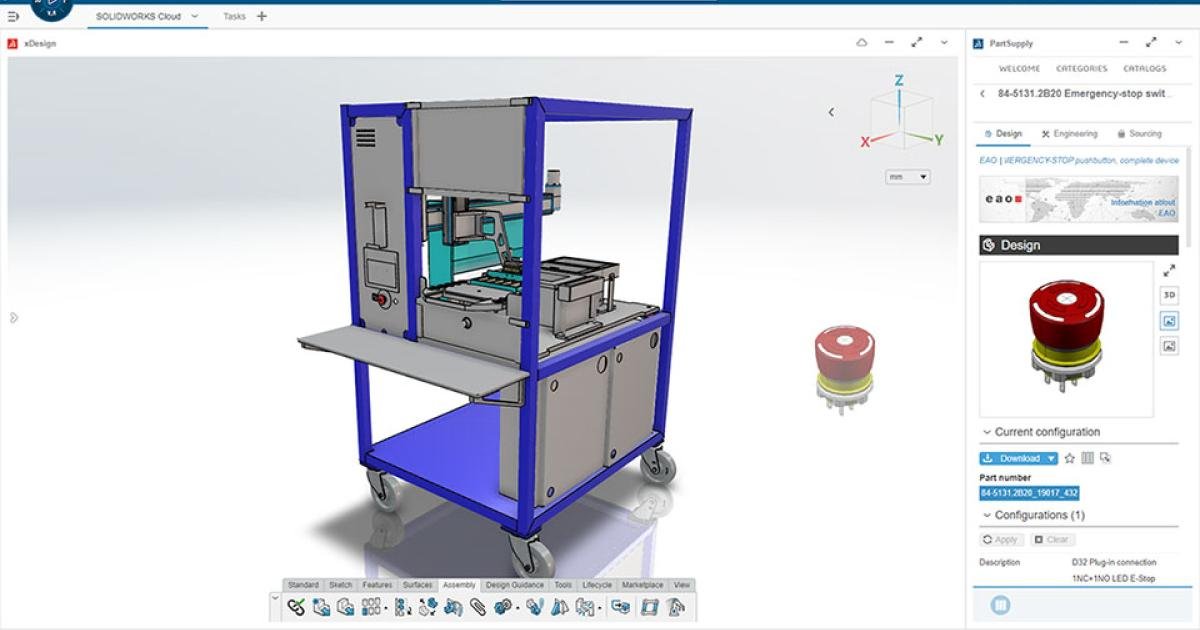
SOLIDWORKS xDesign is a browser-based 3D design solution that helps teams create, collaborate, and manage designs from anywhere. Built by the same team behind SOLIDWORKS 3D CAD, it brings powerful design tools together with cloud-based collaboration. Users can work on any device through a web browser, reduce IT dependency, and scale their design workflow as their business grows.

Use this solution to improve the way your team creates, documents, reviews, and prepares product designs. Khodiyar Infotech helps you choose the right SOLIDWORKS software, plan licensing, train users, and support adoption after implementation.

  • Browser-based 3D design
  • Cloud storage and sharing
  • Multi-device access
  • Collaborative design reviews
Talk to a SOLIDWORKS Expert →
SOLIDWORKS_DESIGN.IDEv.Official SOLIDWORKS Solution
SOFTWARE_INTERFACE.PNG
// 02 — Benefits

How SOLIDWORKS xDesign Helps Your Team.

/// 01
+01

Work from Anywhere

SOLIDWORKS xDesign runs in a browser, allowing users to access design tools from supported devices without being tied to one workstation. This helps teams work from the office, home, or different locations while staying connected to their product data.

/// 02
+02

Design More Flexibly

xDesign supports different design needs, from parametric modeling to freeform shapes, sheet metal, structures, and product documentation. This gives teams the flexibility to handle multiple design workflows inside one connected cloud-based environment.

/// 03
+03

Collaborate Easily

Because xDesign works with the 3DEXPERIENCE platform, teams can store, share, review, and manage product data in the cloud. This improves communication between designers, engineers, managers, and other stakeholders during product development.

/// 04
+04

Reduce IT Dependency

Browser-based access helps reduce the need for heavy local installation and workstation-based dependency. Teams can scale design access more easily while keeping product data connected through cloud services.

// 03 — Capabilities

SOLIDWORKS xDesign Capabilities.

Key workflow areas where this solution helps teams improve productivity, accuracy, and collaboration.

/// CAPABILITY 01

Browser-based 3D design

Use SOLIDWORKS xDesign to support browser-based 3d design as part of a more controlled and productive engineering workflow.

Request Guidance →
BROWSER-BASED_3D_DESIGN.PNG
/// CAPABILITY 02

Cloud storage and sharing

Use SOLIDWORKS xDesign to support cloud storage and sharing as part of a more controlled and productive engineering workflow.

Request Guidance →
CLOUD_STORAGE_AND_SHARING.PNG
/// CAPABILITY 03

Multi-device access

Use SOLIDWORKS xDesign to support multi-device access as part of a more controlled and productive engineering workflow.

Request Guidance →
MULTI-DEVICE_ACCESS.PNG
/// CAPABILITY 04

Collaborative design reviews

Use SOLIDWORKS xDesign to support collaborative design reviews as part of a more controlled and productive engineering workflow.

Request Guidance →
COLLABORATIVE_DESIGN_REVIEWS.PNG
// 04 — Packages

SOLIDWORKS xDesign Package Guidance.

Use this section only when package comparison is relevant. Khodiyar Infotech can help you select the right license based on your workflow.

FeatureStandardProfessional RecommendedPremium
3D Part Modeling
Assembly Design
2D Drawings
Design Reuse Tools
CAD Libraries
Manufacturability Checks
Cost Estimation
Photo-Realistic Rendering
Advanced Component Libraries
Design Validation
Motion Analysis
Routing Tools
Advanced Simulation
Cloud Collaboration
Data Management Support
Training and Support

Not Sure Which Package is Right?

Khodiyar Infotech can help you compare Standard, Professional, and Premium options based on your actual workflow.

Compare Packages with Expert →
// 05 — Licensing

Licensing and Deployment Guidance.

Three ways to deploy SOLIDWORKS Design — pick the model that fits how your team actually works.

/// LIC.01
01

Individual License

Ideal for individual designers, engineers, or professionals who need dedicated access.

  • Named-user access\nFlexible usage\nBest for individual CAD users
Ask About License →
/// LIC.02
02

Team / Network License

Suitable for engineering teams, shared workstations, and controlled business environments.

  • Team-based access\nCentralized control\nSuitable for growing design teams
Ask About License →
/// LIC.03
03

Cloud-Connected Options

For teams that need collaboration, review, and connected workflows across locations.

  • Cloud collaboration\nDesign sharing\nBetter team communication
Ask About License →
// 06 — Why Buy from Us

Why Buy SOLIDWORKS Through
Khodiyar Infotech?

We do more than provide software. We help your team select, implement, learn, and use SOLIDWORKS with confidence.

/// 01
01

Product Consultation

Understand which SOLIDWORKS product and package fits your workflow.

/// 02
02

License Selection

Get clear guidance before investing in software.

/// 03
03

Installation & Setup Support

Get assistance with setup, deployment, and onboarding.

/// 04
04

Training & Ongoing Assistance

Help your team build practical skills and use the software effectively.

// 07 — Training

SOLIDWORKS Training for Better Adoption.

Software value depends on how confidently your team can use it. We provide practical training to help users improve speed, accuracy, and workflow confidence.

/// TRACK.01

Beginner Training

Get up to speed on SOLIDWORKS fundamentals — modeling, sketching, drawings, and assemblies.

  • Sketching & part modeling\nAssembly basics\n2D drawing creation
View Training →
/// TRACK.02

Advanced CAD Training

Tackle complex modeling techniques, surfacing, sheet metal, and weldments with expert guidance.

  • Advanced part techniques\nSheet metal & weldments\nTop-down design
View Training →
/// TRACK.03

Team Workflow Training

Train teams on shared workflows, design standards, libraries, and PDM best practices.

  • Design standards\nPDM workflow basics\nLibrary & template setup
View Training →
// 09 — Use Cases

Where SOLIDWORKS xDesign is Commonly Used.

SOLIDWORKS xDesign is useful for teams that need flexible browser-based design tools, cloud collaboration, and connected product development workflows.

+
Product Design

For creating parts, assemblies, concepts, and product models in a browser-based CAD environment.

+
Industrial Design

For exploring product form, ergonomic shapes, styling, and early concept development.

+
Sheet Metal Design

For creating sheet metal parts, enclosures, and production-ready flat pattern workflows.

+
Structure Design

For designing frames, supports, welded-style layouts, and structural product elements.

+
Product Documentation

For creating drawings, manufacturing information, and design communication content.

+
Design Collaboration

For storing, sharing, reviewing, and managing product data through the 3DEXPERIENCE platform.

// 10 — FAQ

Frequently Asked Questions About SOLIDWORKS xDesign.

Common questions teams ask before selecting, implementing, or training users on this solution.

01What is SOLIDWORKS xDesign?

SOLIDWORKS xDesign is a browser-based suite of product development tools that helps users create, manage, visualize, and collaborate on product designs from the cloud.

02Is SOLIDWORKS xDesign browser-based?

Yes. SOLIDWORKS xDesign is designed to work through a browser, allowing users to access design tools from supported devices with an internet connection.

03What design tools are included in xDesign?

It includes tools for parametric design, freeform design, sheet metal, structure design, manufacturing definition, rendering, and product communication workflows.

04Can xDesign help with collaboration?

Yes. It connects with the 3DEXPERIENCE platform, helping teams store data, share designs, manage updates, and collaborate through cloud-based workflows.

05Is xDesign useful for sheet metal design?

Yes. SOLIDWORKS xDesign includes cloud-based sheet metal capabilities through 3D SheetMetal Creator for creating sheet metal parts and flat pattern workflows.

06Can Khodiyar Infotech help with setup?

Yes. Khodiyar Infotech can help with product guidance, licensing support, platform setup, onboarding, and training for SOLIDWORKS xDesign.

// Ready to Talk

Need Help Choosing
SOLIDWORKS xDesign?

Khodiyar Infotech can help you understand licensing, implementation requirements, training options, and the right next step for your team.

ProductSOLIDWORKS xDesign
Packages3 Tiers
Free ConsultationIncluded
Quote Validity30 Days
LanguagesEN · HI · GU